By Lee Sykes
November 2006
In this tutorial we demonstrate how to use the DotNetNuke Documents module.
The Documents module has received various improvements over the earlier versions of DotNetNuke.
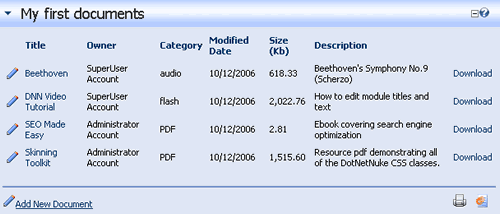
The Documents module provides a list of links to documents which you can download. You can link to documents within your DotNetNuke portal, or you can enter a URL to a file on another website. Each of the documents can track and log the number of clicks / downloads.
The Documents module interacts with the permissions set in the File Manager (view the
File Manager tutorial for further information) which allows you to specify which users have permission to download a particular document.
The new functions within the documents module allow for a flexible configuration of the display, including selecting which columns are visible, specifying the order of the columns, setting up a list of categories to choose from a drop down box, and specifying a sort order for the documents.
Uses for the module could include:
- Company documents, such as PDF, Word documents etc.
- A collection of files contained within zip files
- Music and video files
- Etc.
These 3 video tutorials walk you through step by step how to configure all of the settings within the documents module.
Video 1 - Introduction, adding documents, uploading files
- Adding the documents module to a page
- How to add a document to the module
- Adding a Title, Description, Category
- Changing the owner
- URL and File link types
- Uploading a new file
- Logging the downloads
- Sort Order Index
Time Length: 5min 50secs
Video 2 - The documents settings, uploading
- Adding a second document
- Demonstration of sort order index
- Documents module settings
- Show Title Link
- How to select which columns in the module are visible
- How to re-order the module columns
- Enabling sorting
- Specifying the sort order for the columns
- How to sort by Title and Category
- Demonstration of uploading restricted file types
- Configuring DotNetNuke to allow the uploading of certain file types, eg. mp3, wma etc.
Time Length: 6min 10secs
Video 3 - Creating a category list, logs, editing, deleting, updating, permissions
- Enabling Categories List
- How to create a category list
- Adding a third document, a music file
- Demonstration of using the new category list
- How to edit a document
- Selecting a category list item for a previously created document
- How to view the number of times a link is clicked
- How to view the user, date, and time for every link click
- How to delete a document
- Adding a fourth document
- How to allow certain users access to download a file ie. registered users or subscribers
- The interaction of the documents module with the File Manager
Time Length: 9min 4secs
Total Time Length: 21min 4secs