How to set up DotNetNuke to accept subscription payments

By Lee Sykes
October 2006

In this tutorial we demonstrate how to setup DotNetNuke to accept subscription payments using PayPal.

These features are built in to DotNetNuke, so you can set this up for free without having to make payments for additional ecommerce modules.

Using DotNetNuke’s subscription facilities, registered users can pay to access subscriber only content such as articles, ebooks, music and video downloads etc.

We demonstrate how you can set this up using security roles in DotNetNuke. This tutorial builds on the security roles tutorials from issue 1 and issue 14.
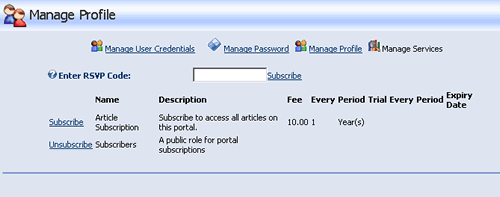
subscription page

Video

  • Configuring DotNetNuke to send payments to your PayPal account
  • Creating a new Security Role for subscribers to access articles on the website
  • Setting up the Advanced Settings
  • Configuring a subscription price and billing period
  • Creating a page where only the subscribers can access the content
  • Testing the subscription configuration
  • Registering as a new user
  • Subscribing and testing the sign up process as a user
Time Length: 7min 52secs

You need to Subscribe as a member of DNN Creative Magazine and Login to download this video tutorial.


Other areas of interest:

How to Quickly Edit Module Titles and Text
User Accounts new features in DotNetNuke 4.3+
User Accounts and User Settings
Enforcing Terms and Conditions on User Registration
How to Create a Custom Registration Page Using Manage Profile Properties
DotNetNuke User Profile Features v5.4
Security Roles new features
File Manager
Page Management – New Functions DotNetNuke v4.5+
DotNetNuke Authentication Settings (Configuring the Login Page)
DotNetNuke Ribbon Bar Admin Control Panel


Administrator Tutorials:
DotNetNuke Users & Setting the Registration Options
Working with DotNetNuke Security Roles
Specifying The Required Fields Upon User Registration
User Accounts: Adding, Editing, Viewing, Deleting
How to Assign a Security Role to a User Account
DotNetNuke 5 Page and Module Permissions
Assigning Security Roles to Pages and Modules
The Advanced Page Settings
Managing Pages
How to create Page Templates in DotNetNuke
How to create an RSS feed
How to display RSS feeds
How to set up DotNetNuke to accept subscription payments
How to set up email in DotNetNuke
How to send Newsletters in DotNetNuke
Working with Vendors, Banners and Affiliates
How to limit access to the admin menu
Token Replacement in DotNetNuke
Using Favicons within DotNetNuke
DotNetNuke Recycle Bin
How to Reset Host and Admin Login Details
How to Limit Access to Administrator Modules in DotNetNuke 5
How to Limit Modules Available in the Control Panel (Premium Modules)
How to Configure Which Modules Non-Administrators Can Add to a Page
Taxonomy and Folksonomy in DotNetNuke
You are not logged in.
You must log in to access all 
650+ videos, tutorials, podcasts, and more.
RSS Feeds