November 2006
Within our GymnasticsMedia.com portal, we have enabled the users to customize their forum profile by selecting an avatar image from a selection of images stored in the portal files.
We found a solution to this by combining the
ActiveForums module with the
XMod Module. We created the ability to select an avatar with XMod, and a AJAX call to an aspx page that updated the Active Forums tables.
This tutorial outlines how we combined the two modules to work together.
If you have any questions regarding this, then please ask any questions at
this forum post 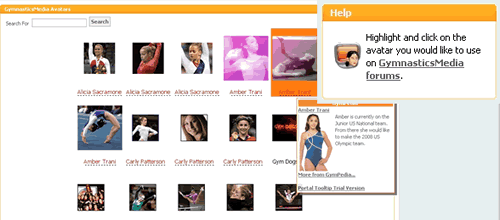
The XMod Form
Our form has two fields, Name & Avatar. The Name field allows us to sort the avatars in the template list view (
green). The Avatar field allows us to upload the avatar file to the directory SystemAvatar, and store the file name in Avatar field (
orange). The UserName field is hidden and allows us to store which user added the avatar (
red). The last portion of the form emails us when a user submits a new avatar (
blue).
<form>
<register tagprefix="abmc" namespace="knowbetter.xmodcontrols" assembly="knowbetter.xmodcontrols" />
<controls>
<input ref="Name">
<label>Name</label>
<validate type="required" errormessage="Name required" />
</input>
<custom tagprefix="abmc" name="FileUpload" ref="Avatar" cssclass="NormalTextBox" cssclasslink="Normal" extensions="jpg,gif" uploaddirectory="SystemAvatar" noneselected="true" uploadsuccessmsg="Avatar Uploaded" required="true">
<label>Avatar</label>
</custom>
<hidden ref="UserName">{XMOD_UserUsername}</hidden>
<email target="gymnasticsmedia@somedomain.com" from="Admin@somedomain.com" subject="New Avatar Uploaded">
<content format="html">
<literal>
New Avatar Uploaded!
</literal>
</content>
</email>
</controls>
</form>
XMod Template
The XMod template is a list view showing all the avatar images available, while allowing the user to highlight, and click to select the avatar to be used in Active Forum.
Highlighting the Image to be Selected
We implement events onMouseOver & onMouseLeave of the table encapsulating the avatar image. This code is highlighted in
orange.
Selecting the Avatar
We implement the onClick event of the table encapsulating the avatar image.
This calls the the selectavatar.aspx passing in the variables portal id, user id, and avatar name via XMod constants {XMOD_PortalId}, {XMOD_UserId}, and our XMod form field Avatar. This code is highlighted in
green.
<xmod:scriptblock scriptid="AjaxCallback" registeronce="true" blocktype="ClientScript">
<script language="javascript" type="text/javascript">
function showResults(status,statusText,responseText,responseXML){
alert('Avatar Saved!');
}
</script>
</xmod:scriptblock>
<xmod:ajax id="ajax<xmod:recordid/>" action="CallFunction" target="showResults"/>
<table onclick="ajax<xmod:recordid/>.call('/selectavatar.aspx?pid={XMOD_PortalId}&uid={XMOD_UserId}&avatar=<xmod:field name="Avatar"/>')" onMouseOver="javascript:this.bgColor='#fc7d14';" onMouseLeave="javascript:this.bgColor='#FFFFFF';"><tr><td style="height:130" align="center"><img src="/Portals/{XMOD_PortalId}/SystemAvatar/<xmod:field name="Avatar"/>" name="theImage" alt="<xmod:field name="Name"/> photo"/></td></tr>
<tr><td align="center">
<font size="-1"><xmod:field name="Name" /></font>
</td></tr></table>
Selectavatar.aspx
The selectavatar.aspx is stored at the root of the website (not the portal root), simply takes in portalid, userid, avatar url encoded parameters, and save the avatar to Active Forum User Details table.
Private Sub Page_Load(ByVal sender As System.Object, ByVal e As System.EventArgs) Handles MyBase.Load
Dim objConn As New SqlClient.SqlConnection("Server=someserver;Database=somedatabase;uid=someuserid;pwd=somepassword;")
Dim objCommand As New SqlClient.SqlCommand
Dim sql As String
Dim PortalID As String
Dim UserID As String
Dim Avatar As String
Try
PortalID = Request.QueryString("pid")
UserID = Request.QueryString("uid")
Avatar = "/Portals/" & PortalID & "/SystemAvatar/" & Request.QueryString("avatar")
sql = "UPDATE NTForums_UserDetails SET AvatarLink=@Avatar, AvatarFileName='' WHERE PortalID=@PortalID AND UserID=@UserID"
objConn.Open()
objCommand.Connection = objConn
objCommand.CommandText = sql
objCommand.Parameters.Add("@Avatar", Avatar)
objCommand.Parameters.Add("@PortalID", PortalID)
objCommand.Parameters.Add("@UserID", UserID)
objCommand.ExecuteNonQuery()
Catch ex As Exception
Throw ex
Finally
objConn.Close()
objConn.Dispose()
objCommand.Dispose()
End Try
End Sub
Kirk Dickens is the founder of GymnasticsMedia.com
GymnasticsMedia.com has adopted DotNetNuke as its platform for delivering content, while giving users a rich, and comfortable user interface. Our goal is to be the ultimate portal for gymnastics fans.