Hello,
I am trying to replace the default bullet points with an image. I've managed to achieve this, with different images used for different indentation levels.
I had some issues, most of which I've resolved:
1) I've restricted the bullet images to display in the content area of the site using a css id within the skin. This prevents the bullet images appearing in the menu.
2) I've included some css to prevent the bullet images displaying in the toolbar of the richtexteditor.
The only problem (so far) is that neither the bullet image or default bullet point is displayed in the richtext box content area at the top level, 2nd and 3rd level bullets points display OK. No top level image or point at the top level is really confusing.
I've tried to include a line to put the default bullet back into the richtext editor only:
#document li {list-style-type: disc;}
But this doesn't work.
So how can i display the bullet images on a page but maintain some indication within the richtext editor for the top level bullet? Would prefer to display the bullet image but the default bullet point would do.
Also, are there any other issues that i need to be aware of?
My CSS is below, the comments should explain everything. Please let me know if not.
I know a picture paints a thousand words so I've included a couple of images.
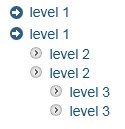
Image 1: Shows how the bullets display on the page.
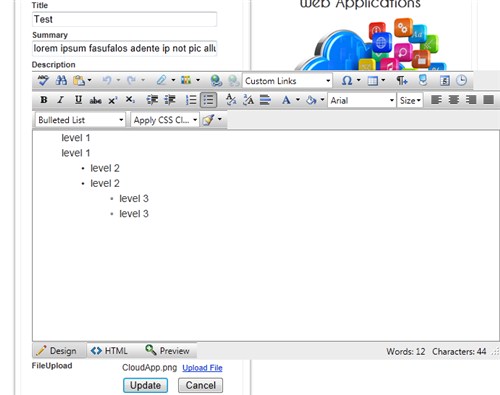
Image 2: Shows how the bullets display in the richtext editor.
Obviously, it looks more confusing when there's only a top level of bullets
instead of 3 levels shown here.
Best Regards,
Steve
/*********************************************************
BULLET POINT IMAGES
This CSS replaces the default bullet point with an image
The #skin_main id identifies the content area of the skin,
this excludes the menu.
**********************************************************/
/* Allow the default bullet point to display in the rich text editor */
#document li
{
list-style-type: disc;
}
/* Prevent the default bullet (top level) from displaying within the main skin area */
#skin_main ul
{
list-style: none;
margin:0 0 1em 0px;
padding: 0;
}
/* Set the bullet image for top level bullets and give the items some space */
#skin_main ul li
{
line-height:1.3em;
margin: .25em 0;
padding: 0 0 0 20px; /* move the text to the right of the image */
background:url(images/blockcontentbullets.png) no-repeat 0 0px;
}
/* Set the spacing for sub first level bullet lists */
#skin_main ul li ul
{
margin:0 0 1em 0px;
padding: 0;
}
/* Set the image and spacing for sub first level bullet items */
#skin_main ul li li
{
line-height:1.1em;
list-style: none;
margin: .25em 0;
padding: 0 0 0 20px;
background:url(images/postbullets.png) no-repeat 0 0px;
}
/* prevent the bullet icon displaying in the richtext editor toolbar */
.RadEditor ul li, .reDropDownBody ul li
{
background-image: url("/WebResource.axd?d=0m6u2gHLYHehT8StqhecpF5qMcyEfvEBwzRI70QwFnLj5qKLL2KbYboyDyueuVusjP_Ir-_2xAl4fTZBtcMbYqaOIa2XZtPTTAGDtkR0m0F9RY8DAhzaHHs2TiCpSj0pV5z2zP9ONUviAIM9W0CYlD49jvU1&t=634724466147830547")!important;
background-position: 0 -26px!important;
color: #000000;
background-repeat: repeat-x!important;
}