By Lee Sykes
April 2006
This free video tutorial demonstrates how to install the FCKEditor. This editor can be used to replace the FreeTextBox editor that comes as standard with DotNetNuke®.
The FCKEditor is a WYSIWYG text editor that allows you to add text and image content to your modules.
The main module that you will use with the FCKEditor is the Text/HTML module.
I personally always replace the FreeTextBox editor with the FCKEditor as I find the FCKEditor to be more stable and reliable than the FreeTextBox editor.
The FCKEditor also has some further advantages over the FreeTextBox editor including:
- XHTML 1.0 Compliant (essential for CSS skins)
- Programmable styles list to easily call classes from your skin.css file (essential for easily editing the layout of your text and images and creating clean code)
- Custom editor options for configuring the display per instance / module / portal
- Optional display of toolbars dependant on roles
- Editor area CSS allows the editor to display the content styled exactly as it will look on the live web page
- Cut, Paste and Paste as Plain Text, Undo and Redo
- Paste from Word cleanup with auto detection
- Right click in the editor area for quick access to an options menu
Note: In the latest versions of DotNetNuke 4.5+, the FCKEditor now comes installed as default.
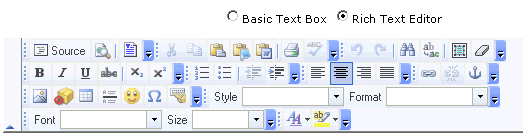
The FCKEditor toolbar
Video
Download the free video and learn how to install the FCKEditor.
Time Length: 7min 8secs
FCKEditor Details:
Download FCKEditor
FCKEditor DotNetNuke Project
You will also find these tutorials useful:
Styling text and images within the Text/HTML module using the skin.css file and the FCKEditor
Bad Practices when working with the Text / HTML module
Note: To install the FCKEditor you have to edit the web.config file. Make sure you backup the file before editing it.