By Lee Sykes
September 2005
This is an independent review of ByDesign's Advanced Announcements for DotNetNuke V3.x, 2.x, 1.x. The review looks at the module for its features, useability, functionality, ease of use, stability, value for money. This review uses DotNetNuke® V3.x
We demonstrate different ways you can use the module within your website.
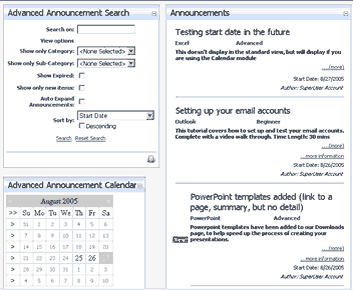
ByDesign’s Advanced Announcements module is based on the standard DotNetNuke® Announcements core module.
Key Features
- Advanced RSS Feeds - including setting the channel title and description of your RSS Feed
- Multiple Feeds are available including - individual items, new announcements and all announcements
- Announcements can be optionally removed from all RSS Feeds
- RSS Feeds are controlled from a HttpModule
- Ability to place any image next to an announcement – includes 6 images
- Announcements can scroll
- Search and Calendar modules - provide the ability to sort / filter and view all announcements, including expired announcements
- Shadowing – place copies of one Announcements module across your website and use filters to create different views of your announcements
- Single Announcement module - allows you to display the full announcement text on another page
- Announcements can be assigned to categories and sub-categories
- An announcement can link to a tab or to an external URL
The sub-headings within the module review include the following:
- Introduction, Key Features, Purchasing
- Installation
- Setup / Configuration
- Categories
- Adding an Announcement
- Link Types and Details
- Single Announcements Module
- Search Module
- Calendar Module
- Shadow Modules and Filtering Categories
- CSS
- Search Engine Compatibility
- Support
- Verdict
- Pros, Cons and Summary
Video Tutorials
Alongside the review are 8 flash video walk throughs / tutorials totalling 39 minutes to demonstrate the modules features and possible uses.
Video 1
- Quick overview of the features and a demonstration of the module in action
Video 2
- How to install the module
Video 3
- How to configure the module
Video 4
- How to add an announcement
Video 5
- How to edit / delete announcements
- Demonstration of the different link types
Video 6
- How to configure the single announcements module
Video 7
- The search and calendar modules in action
Video 8
- How to add a shadow announcements module and filter by categories
Throughout these eight videos we work through practical examples of using the module with a Microsoft Office tutorials website.
Purchasing
This module is available for purchase through snowcovered.com

DNN3.x, 2.x, 1.x
Advanced Announcements – PA and Source … $25.95
VB.NET source is included with the package.