Firefox Live Bookmarks in DotNetNuke
By Lee Sykes
December 2005
Some RSS aggregators have the capability of finding an RSS feed on a web page and making it easy for the user to subscribe to it
An example of this can be seen in the Firefox browser, whenever the browser discovers an RSS feed, it displays an orange icon in the bottom right of the browser window.
If you click on the orange Firefox icon it will give you the option to subscribe to the RSS feed.
In order to enable auto-discovery aggregation, you need to add some code to your page.
• Go to the Page where you wish to display the Firefox orange icon.
• Go to Page Settings
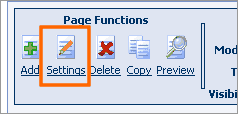
• Go to Advanced Settings / Page Header Tags
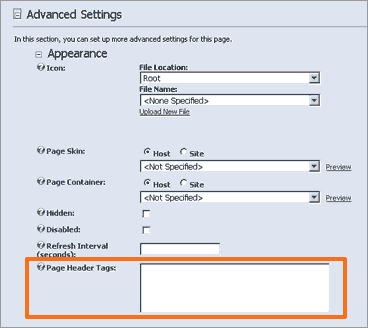
• Enter:
<link rel="alternate" type="application/rss+xml" title="DNN Creative 25 Latest Posts" href=http://www.dnncreative.com/myRSSfeed />
Change the Title to your RSS title and the href=” … “ to your RSS feed URL.
• Click on Update
When viewing the page in Firefox you should now be able to see the orange icon.