By Richard Wootton
January 2009
A favicon (or FAVourite ICON) is typically a small image 16px x 16px; which can be used to identify your website. The favicon uses the extension .ico. This is a special image format which cannot be created by simply renaming a .gif or .jpeg image.
This article walks you through how to create a favicon from scratch, how to create a favicon from an existing image and how to attach the favicon.ico file to your DotNetNuke website.
Why Use a Favicon?
Using favicons is a good way to make your site stand out from a long list of bookmarked pages. If you have spent time creating a logo for your website, you should be using it to the best of its potential and placing your branding wherever possible. By using a favicon you make your pages easier to find in bookmark listings and browser tabs, and you give your customers a familiar image to look for.
Where is a Favicon Used?
The following are examples of where favicons are displayed when using the Firefox browser:
Address Bar
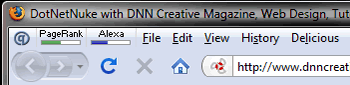
Browser Tabs

Bookmarks
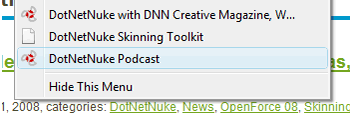
Favicons are generally used in most internet browsers including the following:
Internet Explorer, Opera, Safari and Google Chrome.